Showing posts with label CLOCKWORKMODE[CWM]. Show all posts

Monday, 12 August 2013

CLOCKWORKMOD RECOVERY 6.0.2.8 FORMICROMAX A110

Leave a Comment
Once again thank to suhas.holla for this Recovery for our MICROMAX A110 CANVAS 2 .

Requirements:
1.Root and MOBILE UNCLE TOOLS APP(if u want to flash through Mobile)
2.Sp Flash Tool(If u want to flash it From PC)

Instructions:
1.Download the recovery and Put it in root of your SDCARD
2.Open Mobile uncle tools and select Recovery Update
3.Flash my recovery.img file
4.Done 


Read More...

Thursday, 1 August 2013

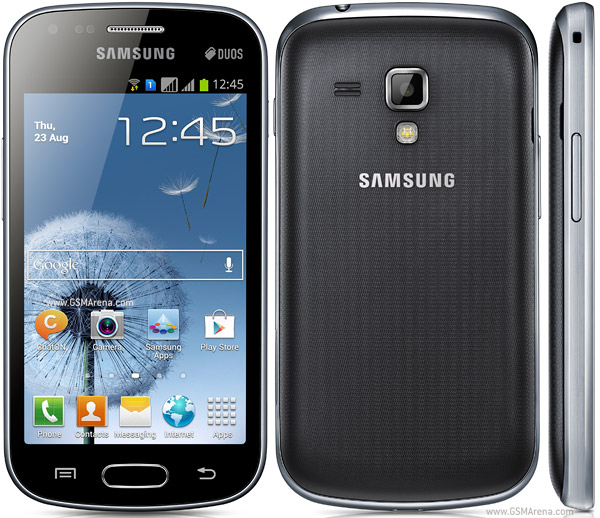
How To Root Samsung Galaxy S Duos S7652 and install CWM in it

4 comments
How To Root Samsung Galaxy S Duos S7562 or Rooting Samsung Galaxy S Duos S7562 or how to install clockworkmod in samsung galaxy s duos s7652 is might you searching. If yes then you are at right place. I will show you how to root samsunggalaxy s duos s7562 in an easy way.
Samsung Galaxy S Duos S7562 has got TFT capacitive touchscreen with 16M colors with 4 inches of screen for better gaming. The internal memory provided with SamsungGalaxy S Duos S7562 is 4 GB so you can store many games in it, if it is less then use your SD Card. Everyone want that their android devices work on tips and the Samsung Galaxy S Duos S7562 works on tips only because it has 768 MB RAM for flawless gaming and fast multitasking. It has 5 MP of camera which captures really nice pictures with some features like auto-focus, LED flash, Geo-tagging etc. If you love to play videos then this is a nice device because it gives up to 30 fps (frames per seconds) playback. The android version provided with Samsung Galaxy S Duos S7562 is Ice Cream Sandwitch 4.0 (ICS) and ICS is very easy and fast to use because it has many nice features but, if it would be jellybean then it would be awesome. Qualcomm MSM7227A Snapdragon is the chipset attached with Samsung Galaxy S Duos S7562 and it is fast chip powered with 1 GHz Cortex-A5 of processor. For gaming it has Adreno 200 GPU which is not very good but still OKAY. I t has many sensors like Accelerometer, proximity, compass etc. For navigation, Samsung Galaxy S Duos S7562 is having A-Class navigation by google. v3.0 is bluetooth is in this SamsungGalaxy S Duos S7562. Oh! lets see how to root samsung galaxy s duos s7562 orrooting samsung galaxy s duos s7652-


How To Root Samsung Galaxy S Duos S7562

* Requirements

1 ClockWorkMod recovery to flash recovery in samsung galaxy s duos s7562- click me.
2 Rooting toolkit to root samsung galaxy s duos s7562- click me.


* How to root samsung galaxy s duos s7562

1 Place that rooting kit in your Desktop.

Install drivers using kies.

3 Shut Down samsung galaxy s duos.

4 Simultaneously press volume down+power+home and then you will be indownloading mode!

5 Open Odin and tick all these as done in this picture:


6 Now, click on PDA and select that rooting kit.

7 Click on big Start button.


Note: something like this will happen in your Odin as shown in upper picture
Now, the phone will vibrate, please remove battery after that vibration.

8 Now, reboot to clockworkmod recovery and follow this guide to root samsung galaxy s duos s7562-

NOW, you have rooted your samsung galaxy s duos s7562!! Now, you can install ROMs and other MODs in your samsung galaxy s duos s7652!
Read More...

How To install ClockworkMod recovery (CWM) in Karbonn Titanium S5

Leave a Comment
How To install  clockworkmod recovery in  Karbonn S5 Titanium if what you searching? If yes then you are at right place. I will be teaching you how to installing CWM in karbonn s5 titanium in a very easy way. Karbonn S5 Titanium is a brilliant phone for low-budget people who cannot buy Micromax A116, actually it is better than it. I mean both Micromax A116 have almost same specifications but i think Karbonn Titanium S5 will be better than Micromax A116 Canvas HD.Karbonn S5 Titanium comes with 5.0 inches of screen which is qHD IPS Capacitive Touchscreen which is really cool and awesome! and better than Micromax A116 Canvas HD which is supposed to be Canvas HD so here is a point we can say that it is better than Micromax A116 Canvas HD. The ROM omg! it is 4 GB ROM which is really awesome now save all your applications, music, pictures in 4 GB storage and you can use external SD card too (Expandable upto 32 GB). We just talked of ROM but what about RAM? The RAM is 1 GB which is really nice and now no need to wait for slow phone to do something that you ordered to it and 1 GB also make gamers who play HD Games in their android devices, most devices these days have 1 GB RAM for example, canvas HD, Samsung Galaxy Grand etc.
Read More...

How To Install ClockWorkMod recovery in Micromax A88 Canvas Music

2 comments
Micromax A88 is a brilliant phone with special feature- LOUD MUSIC! Everyone loves music so micromax released this, now it is getting very popular device. Micromax A88 Canvas Music comes with Android 4.1.2 JellyBean OS. The screen size of this device is decent. 4.5 Inches with 854x480 pixels capactivie screen. It is powered with 1 GHz dual-core MediaTek MT6577 processor. The camera provided is also very good i.e., 5 MegaPixels camera, Auto Focus feature with Dual-LED flash light. For taking pictures of yourself, you are provided 0.3 MegaPixels camera at front side of this device. The RAM provided with this handset is 512 MB which is okay for this mid-range device. 4 GB internal space with 32 GB expandable by SD card. All common features like 3G,Wi-Fi 802.11 b/g/n, Bluetooth, GPS are in this device. When you buy Canvas Music you get JBL Tempo headset for listening music (awesome headset).

Credits
sayan8 for the recovery.
Requirements
CWM Recovery.img  - click here to download
Rooted Micromax A88 Canvas Music- click here
MobileUncle MTK tools (Play Store link)- click here


How To Install ClockWorkMod (CWM) recovery in Micromax A88 Canvas Music-

Download the ClockWorkMod recovery and place it on your SD card.
Download MobileUncle MTK tools and install on your Micromax A88 Canvas Music.
3 Start MobileUncle MTK tools application.
4 Now select update recovery  option and choose the recovery.img you downloadedjust now. (The name of it will be recovery.img)
5 Now, wait for some time. It is flashing ClockWorkMod recovery on your device.
6 After flashing (installing) ends, your phone will be automatically booted to CWM recovery
7. share it you like dex-xda :D
Read More...